password-protected-galleries
Password Protected Galleries: A Practical Guide for Photographers

Password Protected Galleries: A Practical Guide for Photographers
A password protected gallery is an online gallery that opens only for people who know a code you have shared with them. It keeps wedding and event photos away from search engines and strangers, and it lets you decide who sees what. This guide explains how it differs from a public link, how to set one up, how to choose and share a password sensibly, when an OTP is the better choice, and what to do if the password gets out.
We wrote it for photographers and studios, especially those who deliver Indian weddings, where one gallery may be opened by a hundred relatives across three cities.
Its foreverMake Private Photo Delivery EasierIts Forever Studio combines instant uploads, AI face recognition and QR codes to help photographers share curated event galleries with clients and guests.Visit Its Forever Studio
TL;DR
A password protected gallery limits access to people who have the code. A plain public link can be opened by anyone who finds or forwards it.
Use a long, random password and never build it from the couple’s names or the wedding date. Share it through a different channel from the gallery link.
A password is something you know. An OTP is something you have and works once. Neither is phishing-proof, so never ask clients to read an OTP out to you.
Plan for leaks: know how to change the password, withdraw a link and restrict who can select albums.
Guests do not need to remember anything if you pair a private gallery with QR access and face recognition.
Table of Contents
What a password protected gallery actually is
Password, private link or invite-only: which should you use?
How to set up a password protected gallery
Choosing a secure gallery password
How to share the password with clients
OTP or password for photo access?
Other checks that keep a private gallery private
Making private access easy for guests
What to do if the password is shared by accident
Our view: privacy is part of the service
Deliver privately without the link chaos
Sources
What a password protected gallery actually is
A password protected gallery is a page, or a set of pages, where your photos sit behind a gate. Before anyone can view, download or select images, they type a password, or they enter through a link that carries the permission.
Photographers use the term loosely, so it helps to separate three things people mix up:
A public link. Anyone with the address can open the gallery. This is the easiest option and the least private.
A password protected gallery. The address may be shared, but the content opens only after the code is entered.
Invitation-only access. You name the people allowed in, and each person gets their own way in.
Most working studios use a mix. The couple’s full gallery might be private, a small set of highlights might be public for your portfolio, and guests may see only the pictures they appear in.
Why it matters more for Indian weddings
A wedding is not one event. A Haldi, a Mehendi, a Sangeet and the main ceremony can each have different guests, different family sensitivities and different photos. Some images of the bride getting ready, or of relatives who prefer not to be posted online, should never be in a gallery that anyone can open.
There is also the forwarding problem. A link sent to one uncle on WhatsApp reaches the whole extended family within an hour. That is often good for you, since it spreads your work, but you should be the one choosing what spreads.
Password, private link or invite-only: which should you use?
There is no single right answer. The table compares the three on the things photographers actually worry about.
Public link | Password protected | Invite-only | |
|---|---|---|---|
Who can open it | Anyone with the address | Anyone with the address and password | Only people you have approved |
Effort for guests | Lowest | Low, one extra step | Highest, each person needs their own entry |
Risk if forwarded | High | Medium, depends on how the password is shared | Low |
Good for | Portfolio and highlight sets | Couple and family galleries | Closed events, sensitive shoots |
Weak point | No control at all | Password written in the same message as the link | Slow to manage for large guest lists |
For most weddings, a password protected gallery for the couple and immediate family, plus a more guided entry for wider guests, is a sensible balance. For corporate events, private ceremonies or anything involving children or public figures, lean towards invite-only.
How to set up a password protected gallery
The exact buttons depend on the platform you deliver with, but the workflow is almost always the same. Here is the order we suggest.
Decide the audience first. Write down who needs the full gallery (usually the couple and one or two family members) and who only needs their own photos.
Create separate galleries or sections for separate audiences. Do not put everything in one place and hope a single password covers every situation.
Set the password before you upload. If you upload first and protect later, there is a window when the gallery might be open.
Test it yourself. Open the gallery in a private browser window on your phone, not your own logged-in account. Check that it asks for the code and that downloads and selections behave as you expect.
Send the link and the password separately. More on this below.
Note an expiry plan. Decide how long the gallery stays online and tell the client. Our guide on how long a wedding gallery should stay online covers the thinking.
If you deliver during the event, the same logic applies. Instant uploads straight from the camera mean photos appear while guests are still at the venue, so the gate has to be ready before the first frame goes up. Our page on instant photo delivery for photographers explains how that works in practice.
Choosing a secure gallery password
Most leaks do not come from clever hacking. They come from a password that anyone could guess: the couple’s names, the wedding date, the studio name, or 12345.
India’s national cyber security agency gives clear, simple advice here. CERT-In recommends strong, complex passwords that combine uppercase and lowercase letters, numbers and symbols, and says not to use personal information such as birthdays or names. That rule rules out most of the passwords photographers tend to pick for convenience.
A practical way to create one
Use a long random string, or three or four unrelated words joined together. Length helps more than clever substitutions.
Create a new password for every gallery. Reusing one password across clients means one leak exposes every wedding you have shot.
Avoid anything a guest could guess from the invitation card or the wedding hashtag.
Store passwords in a password manager or a protected notes file, not in a WhatsApp chat with yourself.
Remember that people must type it
A password that is impossible to read aloud or type on a phone keypad causes support calls. Avoid characters that look alike, such as the capital letter O and the number 0, or a lowercase l and a capital I. A string of random words is often a better choice than a jumble of symbols when you expect elders to type it on a small screen.
How to share the password with clients
The most common mistake is sending the link and the password in the same message. If that message is forwarded, the gate is open to whoever receives it.
A safer routine:
Send the gallery link by email or WhatsApp.
Send the password by a different route, for example a phone call or a separate message a few minutes later.
Send it to one named person, usually the bride or groom or the family member who is paying. Let them decide who else should have it.
Tell them plainly that the gallery is private and that anyone they forward it to can open it.
Never post the password in a large family WhatsApp group. Once it is there, you cannot control it.
Write a short line in your delivery message that sets this expectation. Clients are usually happy to follow it, because it shows you take their privacy seriously.
OTP or password for photo access?
Readers often ask whether a one-time password is better than a fixed one. The honest answer is that they solve different problems.
According to NIST’s guidance on authenticators, a password is something you know, while an OTP is something you have and is used only once. The same guidance notes that neither passwords nor OTPs are phishing-resistant, and that OTPs should be used with caution where sensitive data is involved.
Where a password wins
It is simple. Nothing has to arrive on a phone, so it works even with poor network at a venue or a farmhouse.
It suits a family gallery that many people will open over months or years.
It is easy to explain to someone who is not comfortable with technology.
Where an OTP wins
A code that expires after one use cannot be forwarded and used again later.
It ties access to a specific phone number, which helps when you want to know who opened the gallery.
It is a natural extra check for a high-privacy event, or for a client area where selections and payments are involved.
The catch with OTPs
An OTP is only as safe as the person receiving it. CERT-In advises never sharing OTPs, PINs or card details with anyone, and not responding to calls that ask for such information. So if you ever phone a client and ask them to read out a code, you are teaching them exactly the habit scammers rely on. Design your process so that the client enters the code themselves on the gallery page, and never asks for it by call or chat.
NIST also points out that multi-factor methods based on shared secrets, including SMS codes and OTPs, remain open to phishing, even though they are far stronger than a single factor. For a wedding gallery that is a perfectly reasonable level of protection, as long as you do not oversell it to clients.
A simple rule of thumb
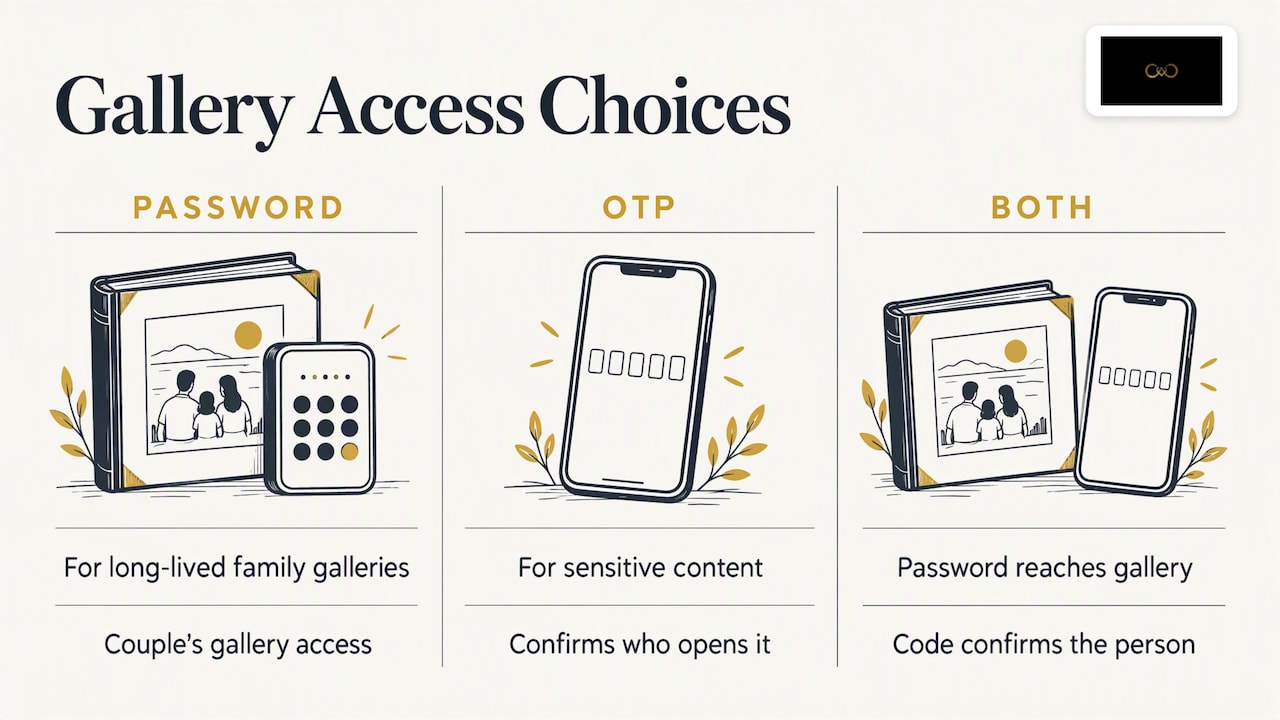
Use a password for the couple’s long-lived family gallery. Use an OTP, or a second step, where the content is more sensitive or where you want to confirm who is opening it. If you can, combine both: a password to reach the gallery and a code to confirm the person.
Other checks that keep a private gallery private
A password is one layer. Security authorities consistently recommend adding another. CERT-In’s guidance recommends multi-factor authentication as an extra layer beyond a password alone, and it is worth applying to your own photographer account, since that is the door to every client’s photos.
Beyond that, these habits matter more than any single feature:
Protect your own login. Use a strong, unique password and a second step for your studio account.
Control downloads. Decide whether guests can download full-resolution files or only view and select.
Separate selection from viewing. The person who picks album photos should not need the same access as a guest who just wants their pictures. Our album proofing workflow shows how to keep that clean.
Limit who sees whom. Guests should find themselves, not browse every candid of every relative. Face recognition helps here, because each guest can be shown their own photos rather than the whole set. See how face recognition photo sharing for weddings works.
Remove old galleries. A gallery that stays online forever with the same password is a growing risk.
Keep a record. Note which gallery has which password, who received it and when you shared it.
Making private access easy for guests
There is a trade-off every photographer feels. The stricter the gate, the fewer guests actually open the gallery. A hundred relatives will not install an app or create an account just to see a Sangeet photo.
A good middle path is to keep the full gallery behind a password for the family, and give guests a lighter way in. A printed or displayed QR code at the venue lets them scan with their phone camera, find their own photos and leave without remembering anything. Our guide to QR code photo sharing for weddings explains the setup, and the longer wedding photo sharing guide for Indian weddings covers how to handle large guest lists.
If you want to think about how the gallery looks and feels once people are inside, read designing a wedding gallery that feels better to use.
What to do if the password is shared by accident
It will happen eventually. A client posts the link and the password together in a family group, or a vendor forwards it to a friend. Stay calm and work through these steps in order.
Check what is exposed. Is it the full gallery, a highlights set, or a selection page? The response depends on the answer.
Change the password straight away. Do this before you send any message. Every old copy of the code stops working.
Withdraw or regenerate the link if you can. A new address makes the old forwarded one useless.
Tell the client briefly and without blame. Say what happened, what you have changed and who should receive the new password. Send the new password separately from the link.
Review access, not only the code. Check whether anyone downloaded images and whether any guest should be removed from the list.
Fix the cause. If the password was weak, replace it with a stronger one. If it was sent together with the link, change your delivery message so it cannot happen again.
Handle sensitive cases personally. If the leak involved private moments, a minor, or a person who asked not to be shown, phone the client rather than writing. Offer to remove specific photos.
The more your system lets you change one gallery without touching the others, the smaller this problem is. It is another reason to give every wedding its own password.
Our view: privacy is part of the service
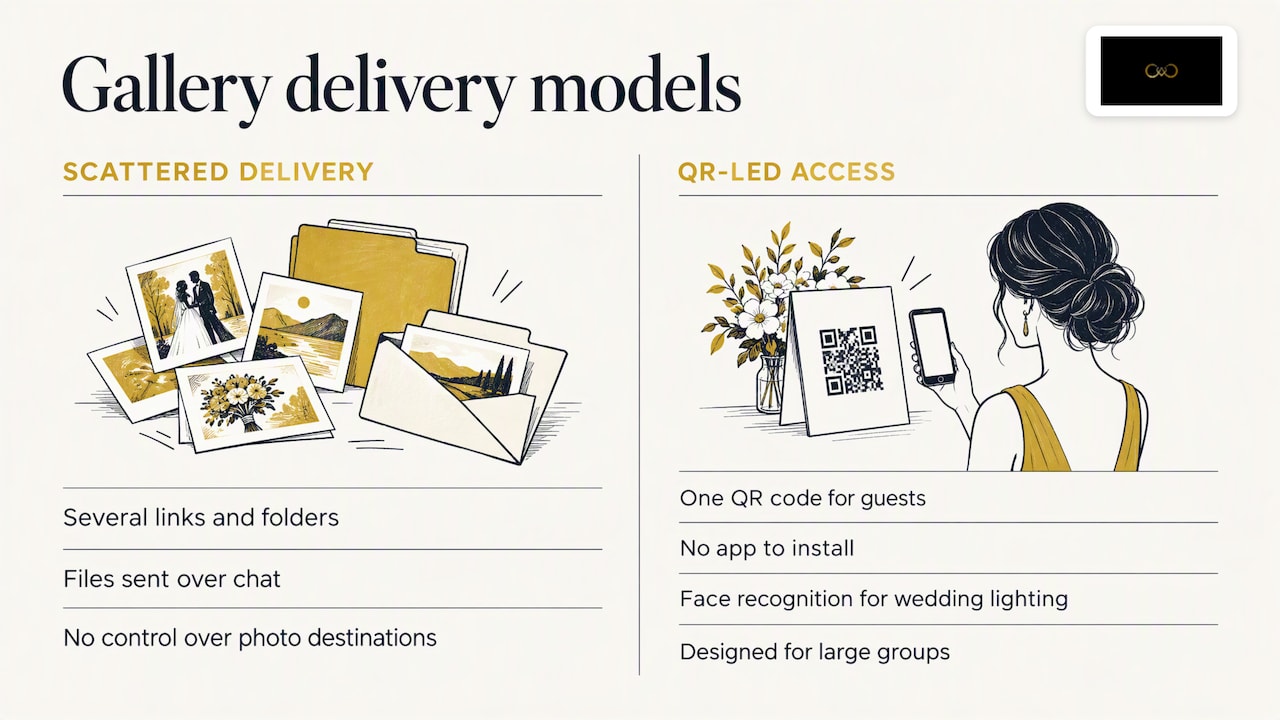
We built It’s Forever around a problem we kept hearing from photographers: delivery was messy. Several links, several folders, files sent over chat, and no control over where any of it ended up. Clients felt unsure, and photographers spent days answering the same question, which was where the photos were.
Our view is that privacy should not feel like an obstacle to guests, and it should not be an afterthought for photographers. That is why we focus on a single QR code for guests, no app to install, face recognition tuned for Indian wedding lighting and large groups, and privacy controls that let hosts manage guest access and album selection.
We also think photographers should be honest with clients about what a password can and cannot do. A password keeps casual viewers out. It does not stop someone who has been given the code from sharing it. The best protection is a process: a strong code, sent separately, to one named person, with a plan for changing it.
And privacy is good for business. A client who feels their photos are handled carefully recommends you to the next family. Read how that works in our piece on turning every wedding into more leads.
— Gowtham
Deliver privately without the link chaos
If you are tired of juggling folders and links, It’s Forever gives you instant uploads from the camera, QR access for guests, branded galleries, online album selection and privacy controls in one place. You pay for the storage and event duration you need after a free trial, with no fixed plans or yearly subscriptions. See how it works at It’s Forever, or look at how wedding photography leads come through the same delivery flow.
FAQ
Is a password protected gallery really secure?
It is secure against casual viewing and search engines, provided the password is strong and shared carefully. It cannot stop someone who has the password from passing it on, so treat it as one layer. Add a second step on your own account and change the password if you suspect it has spread.
Should I use an OTP instead of a password for photo access?
Not necessarily. A password suits a family gallery opened many times, while an OTP suits a one-time or higher-privacy entry. Neither is phishing-proof, and clients should never read an OTP out to anyone over a call or chat.
How do I send the password to a client?
Send the link in one message and the password in another, ideally through a different channel, to one named person. Avoid large family groups. Ask the client to decide who else needs the code.
What makes a good gallery password?
It should be long, random and unique to that gallery, with no names, birthdays or wedding dates in it. CERT-In advises mixing uppercase, lowercase, numbers and symbols. A few unrelated words joined together is also easy to type on a phone.
What if a guest needs access but I do not want to share the full gallery?
Give them a lighter route, such as a QR code that shows only the photos they appear in, instead of the family password. That keeps the full gallery restricted and still gives guests a quick way to find their pictures.
Sources
CERT-In cyber security awareness booklet (passwords, OTPs and personal information)
NIST update on multi-factor authentication and SP 800-63 digital identity guidelines (2022)
CERT-In cyber safety booklet (2025) on multi-factor authentication
Recommended
Deliver photos to every guest — instantly.
Forever handles instant delivery, QR sharing, and face recognition — all in one place. Try it free.
Start for free →