album-proofing-online
Album Proofing Online: A Practical Workflow for Photographers

Album Proofing Online: A Practical Workflow for Photographers
Album proofing online means your client reviews, selects and approves their wedding photos and album layouts in a private web gallery, not through WhatsApp forwards, PDFs and voice notes. Done well, it ends with one clear, approved list and a locked design that goes to print. This guide walks you through the workflow we see working for Indian wedding photographers, from selection to final sign-off.
ItsforeverSimplify Wedding Photo DeliveryItsforever helps photographers share curated event galleries through one QR code, with instant uploads, AI face recognition, and client privacy features.Explore Itsforever Studio
TL;DR
Proofing has two stages: the client picks photos, then approves the designed layout. Keep them separate and keep all feedback in one place.
Send web-resolution, watermarked proofs only. Proofs are for selection, not final delivery.
Keep filenames identical from gallery to final export, so the client’s favourites can be matched in Lightroom within minutes.
Limit revision rounds in your contract and write the number down before the first proof goes out.
Wedding photos carry face data. Under India’s DPDPA 2023, get explicit consent and plan for deletion before you upload.
Table of Contents
What album proofing actually covers
Why the WhatsApp-and-PDF method breaks down
A step-by-step album proofing workflow
Sample timeline for a wedding album
Setting revision limits without sounding rigid
Privacy and consent: do this before you upload
Features to look for in an album proofing tool
Our perspective
How It’s Forever fits into this workflow
Common mistakes to avoid
Sources
What album proofing actually covers
People use the phrase for two different jobs, and mixing them up is where most delays start.
Photo selection. The couple and their families go through the gallery and mark the images they want in the album. For an Indian wedding that can mean 1,500 to 3,500 edited shots across Haldi, Mehendi, Sangeet, the ceremony and the reception.
Layout approval. You (or your designer) place the chosen photos into spreads. The client reviews each spread, comments on it and approves it before printing.
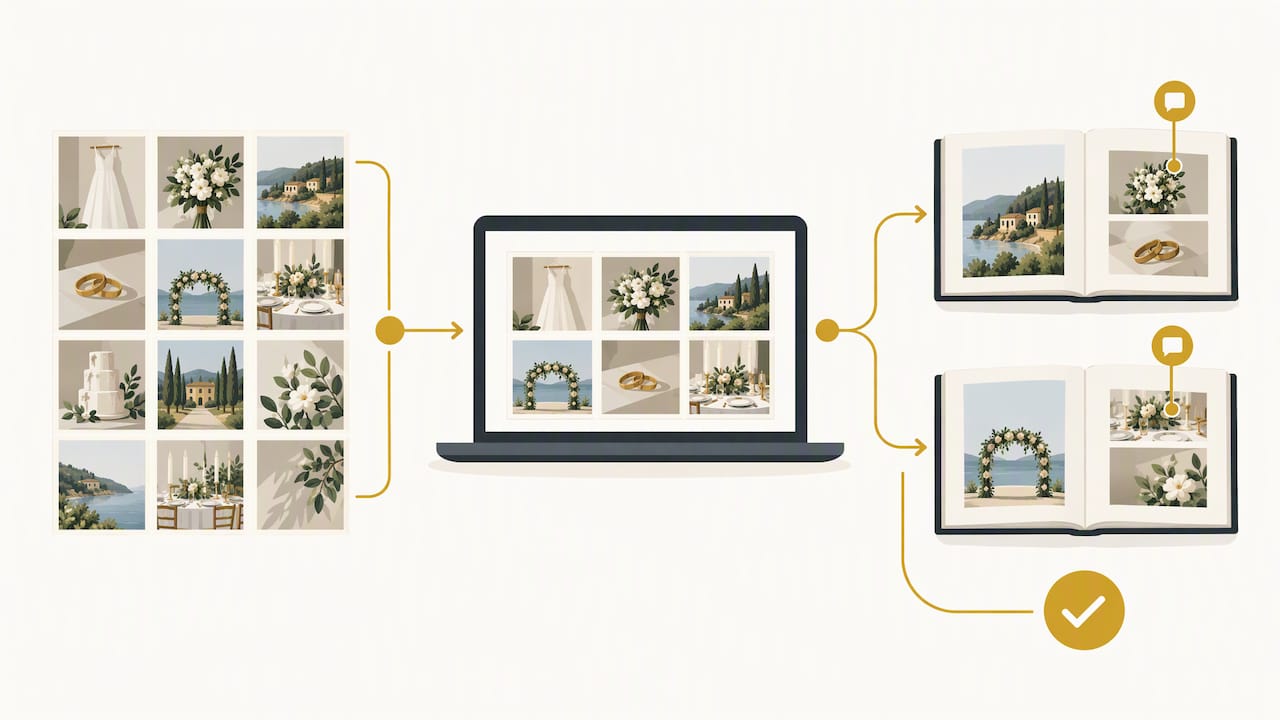
A good online setup handles both in one private link. The client taps a heart on the photos they like, you design from that list, and the same client later comments on spreads in the same place. Nobody has to scroll up a WhatsApp chat to find what “the one near the mandap, not the other one” meant.
Why the WhatsApp-and-PDF method breaks down
Most of us started this way, and it works for a first small shoot. It fails at wedding scale for a few predictable reasons:
Feedback arrives from the bride, the groom, two mothers and an uncle, in four different formats.
Photo names get lost in screenshots, so you guess which frame was meant.
Nobody knows which version of the layout is the latest.
Revisions have no limit because there was never a defined process.
Workflow writers describe the goal of online proofing as moving from chaos to clarity: a visual interface for liking and commenting replaces ambiguity about file names and voice notes. That is the whole point. You are not adding software for its own sake. You are giving the client a simple way to be precise.
A step-by-step album proofing workflow
1. Cull and edit before anyone sees a proof
An unfinished gallery invites unfinished opinions. One working photographer describes a first cull pass that is quick and instinctive, keeping the strong frames before a second, stricter pass. Whatever your method, send the client only photos you would be happy to see in the album. Fifty near-identical frames of the same pheras moment make selection harder, not easier.
2. Organise the gallery by event
Split the gallery into the functions your couple actually had: Haldi, Mehendi, Sangeet, Baraat, ceremony, reception, portraits. Families open the gallery looking for their own moments. Clear folders mean the bride’s cousins do not need to scroll through 3,000 images to find the Mehendi.
3. Export proofs at web size, with a watermark
Proofs are for choosing. Do not send print-ready files at this stage. A common recommendation is to export at around 2048px on the long edge with a semi-transparent watermark. That keeps unfinished images from being printed or passed around as finals, which is a familiar leak in wedding work. Final high-resolution files go out after the album is approved and any agreed payment is complete.
4. Let the client heart their favourites
A favouriting feature beats a spreadsheet every time. Reports on AI-gallery workflows suggest most clients finish their selection in under 30 minutes when they can simply tap the hearts. Tell the couple how many photos the album holds, so the selection fits the page count from the start. Our wedding album selection page shows how this step works in It’s Forever.
5. Turn the favourites into an edit list
This is where hours are saved. A practical workflow is to export the client’s favourites as a CSV list of filenames and paste them into Lightroom’s filename filter, isolating the selected images instantly. It only works if the filenames in your proofing gallery match your final exports, so do not rename anything between stages.
6. Design the spreads and send the layout
Design from the confirmed list. Send the layout as one complete draft, not spread by spread over several days. A partial draft produces partial feedback, and you end up in a longer conversation than if you had waited a day to finish.
7. Collect comments in one place and close the loop
Ask the family to nominate one point person. Comments from five people on the same spread are fine, but one person confirms the final answer. Lock and label the approved version, for example “Album v3 approved”, and keep a copy of the approval message before the file goes to the printer.
Sample timeline for a wedding album
Stage | What happens | Who acts |
|---|---|---|
Gallery delivered | Edited, watermarked web proofs by event | You |
Selection | Client hearts favourites against the album page count | Client |
Edit list | Favourites exported and matched by filename | You |
First layout | Complete draft shared for review | You |
Revisions | Agreed number of rounds, comments in one place | Client and you |
Approval | Final version locked and labelled | Client |
Print and delivery | High-resolution files go to the printer | You |
Dates will vary with your edit speed and the family’s availability. What matters is that each row has an owner and an end point.
Setting revision limits without sounding rigid
Unlimited revisions feel generous and become expensive. Put two rounds of changes (or whatever suits your pricing) into the contract, and explain it kindly: “This keeps your album on schedule and means every change gets proper attention.” Offer extra rounds as a paid option instead of refusing outright.
Two habits help here. First, remind the couple before sending the first layout that the selection stage is the time for big decisions, such as which photos to include. Second, ask for changes as specific comments on a specific spread. “Replace the left photo with the one of Dadi blessing the couple” is something you can act on in two minutes.
Privacy and consent: do this before you upload
Wedding galleries hold faces, families, children and sometimes sensitive ceremonies. India’s Digital Personal Data Protection Act, 2023 treats identifiable photographs as personal data, and explicit, informed consent under Section 6 applies to collecting, processing and publishing them.
A few practical points to build into your contract and workflow:
Separate your consents. The guidance we reviewed recommends two checkboxes: one for service delivery and one for marketing, portfolio use or AI training. An opt-out default is not enough.
Make withdrawal possible. The couple should know they can withdraw consent, which means you need a clear way to delete their data from both primary and backup storage.
Do not repurpose data. Photos collected for delivery should not be reused for marketing or model training without fresh, explicit consent.
Have a breach plan. The same guidance says breaches must be reported to the Data Protection Board within 72 hours, and that you need a grievance redressal mechanism.
The law is evolving and its rules have been phased in, so for contract wording specific to your studio, speak to a lawyer who works on data protection. Treat the points above as a checklist for that conversation, not as legal advice.
If you use face recognition for guest galleries, consent matters even more, because face data is biometric. Our overview of face recognition photo sharing for weddings explains how guests find their own photos, and the privacy section below explains how we approach access.
Features to look for in an album proofing tool
When you compare options, judge them against how you actually work. Here are the criteria that matter for Indian wedding photographers:
Criterion | What to check |
|---|---|
Client simplicity | Opens in a browser from a link or QR code, no app or account needed for the family |
Selection | Heart or favourite tool, with a count against the album’s page limit |
Export | A filename list you can use directly in Lightroom |
Protection | Web-resolution proofs, watermarking, and download controls |
Privacy | Access controls, consent support and a way to delete data |
Branding | Your studio’s name and look on the gallery, not someone else’s |
Pricing model | Whether you pay for what you store, or for plans you may not use |
Fit for India | Handling of low-light, large-group, high-colour wedding photos |
Be careful with tools designed mainly for portrait or commercial work. Their workflow may assume one client and a few hundred images, not a wedding with 40 relatives who each want to see themselves.
Our perspective
We built It’s Forever around one problem: the work between finishing the edit and getting the album approved is where photographers lose the most time and goodwill. A client who cannot find their photos or cannot explain which ones they want will message you on WhatsApp, and that is how a simple delivery becomes weeks of back-and-forth.
Our view is that selection should happen where the photos are delivered. If the couple can open one branded gallery, heart their favourites and see them organised by Haldi, Mehendi and the wedding ceremony, you receive a clean list rather than screenshots. That is why album selection sits next to instant uploads, QR access and face recognition in our product, not as a separate tool.
We also think privacy should be the photographer’s decision. Hosts and photographers should control who can see a gallery and which albums are chosen, because families share wedding photos with people who were never meant to see every frame.
And we think proofing should help you win your next booking. A smooth, professional experience is what makes a couple recommend you to their cousin’s fiancé.
— Gowtham
How It’s Forever fits into this workflow
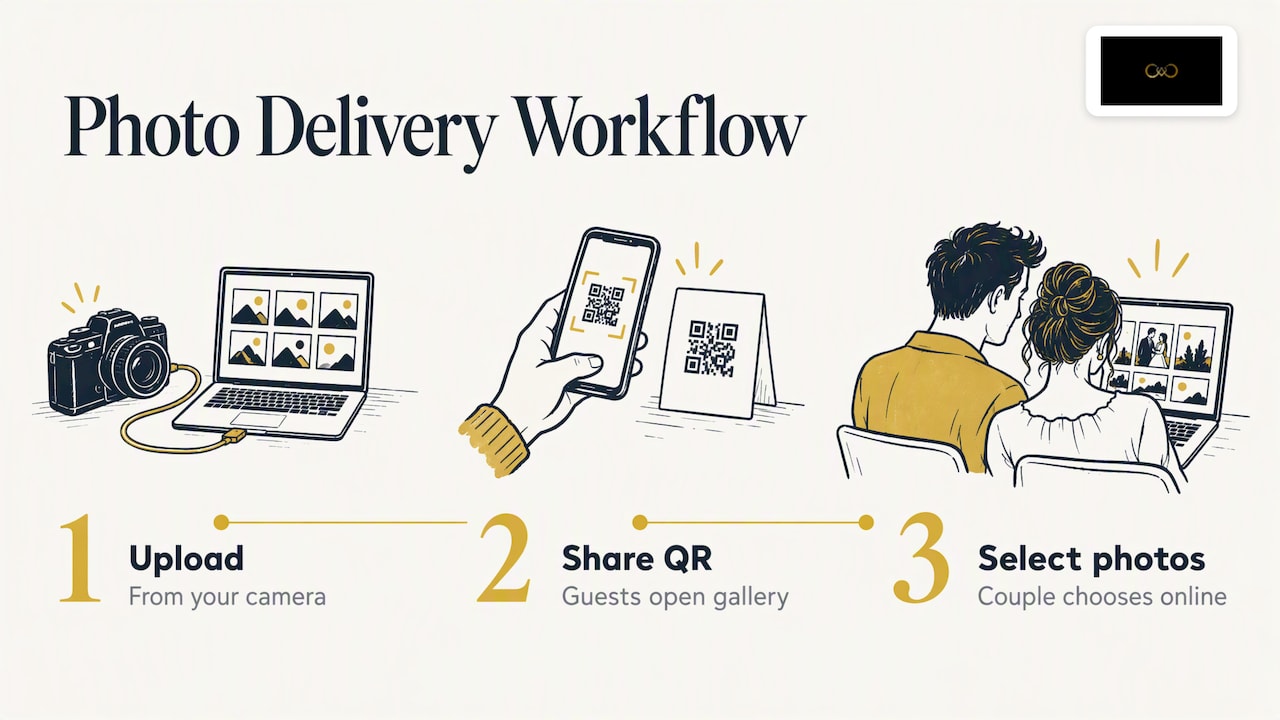
It’s Forever is event photo delivery software for photographers. You upload from your camera, share one QR code so guests can open the gallery without installing an app, and let the couple select photos for the album online. Face recognition tuned for Indian wedding lighting helps guests find themselves, and the gallery carries your branding.
Pricing is pay-as-you-go and depends on storage and event duration, with no fixed plans or yearly subscriptions, and there is a free trial. If you want to see how it would handle your next wedding, start at It’s Forever or look at the instant photo delivery and QR code photo sharing pages first.
Common mistakes to avoid
Sending finals too early. Once a client has full-resolution files, your leverage on payment and approvals disappears.
Renaming files between proof and export. It breaks the filename match and brings back manual hunting.
Accepting feedback on every channel. Say clearly that comments go in the gallery. Copy anything that arrives on WhatsApp into the gallery yourself, once, and then point the client back to it.
Skipping the album page count. If the couple selects 600 photos for a 40-page album, you will have an awkward second selection round.
Forgetting consent. A signed contract with separate checkboxes takes ten minutes and prevents a much longer problem later.
For what happens after the wedding, our post on the work left after the wedding goes through the delivery and follow-up tasks. If gallery design is your concern, read designing a wedding gallery that feels better to use. And to turn happy clients into enquiries, see how wedding photographers can turn every wedding into more leads.
FAQ
What is the difference between a proofing gallery and an album proof?
A proofing gallery is where clients review and choose individual photos. An album proof is the designed layout of those chosen photos, shown spread by spread for approval before printing. Many photographers use the first to feed the second, so the same selections carry through.
Do my clients need to download an app or create an account?
That depends on the tool, and it is worth checking before you commit. Browser-based galleries opened from a link or QR code are easiest for families, especially older relatives. With It’s Forever, guests reach the gallery through a QR code with no app required.
How many revision rounds should I offer?
Two rounds is a common starting point, but it is your call. State the number in your contract, ask for comments on specific spreads, and offer extra rounds as a paid option. Having the limit written down matters more than the exact number.
Should proofs be watermarked?
Yes, for most photographers. Web-resolution files with a semi-transparent watermark are enough for selection and make unauthorised printing or sharing less useful. Send clean, high-resolution finals only after approval.
Is album proofing affected by India’s data protection law?
Yes, because wedding photos are identifiable personal data, and face recognition adds biometric data. Get explicit consent, keep service delivery separate from marketing or AI training, and plan for deletion on request. Ask a data protection lawyer to review your contract wording.
Sources
Photographers require DPDPA Law Compliance and Consent Forms
Your Guests Found Every Photo of Themselves in 2 Seconds, Medium
Recommended
Deliver photos to every guest — instantly.
Forever handles instant delivery, QR sharing, and face recognition — all in one place. Try it free.
Start for free →