event-photo-qr-code
Event Photo QR Code: Setup, Signs and Privacy Guide

Event Photo QR Code: Setup, Signs and Privacy Guide
An event photo QR code is a square code that guests scan with their phone camera to reach one gallery for the event. They can view photos, download their own, or in some set-ups upload pictures, without installing an app or hunting through WhatsApp forwards. This guide explains how it works, how to create and test one, where to place it at a wedding, and what to do when guests struggle to scan it.
We wrote it for two readers: photographers who want to hand over photos in an organised way, and couples or hosts who want guests’ pictures in one place.
ItsforeverShare Event Photos in One GalleryItsforever gives photographers a single QR code for curated galleries, with instant uploads, AI face recognition and client privacy features.Explore Itsforever Studio
TL;DR
One QR code replaces many links: guests scan it and land on a single event gallery, with no app to install.
Create the code from the gallery link, then test it on at least two phones, one Android and one iPhone, before printing.
Put the code where guests wait or sit (entrance, tables, bar, photo booth), with a short sign that tells them what they get by scanning.
Decide who can view and who can upload before the event. Under India’s data protection law, consent and purpose matter when personal data, including faces, is handled.
Keep a backup: a short link on the sign and a person who can help guests who cannot scan.
Table of Contents
What an event photo QR code actually does
How guests view and share photos with the code
How to create and test an event photo QR code
How photographers can deliver an organised gallery with a QR code
How couples can use a QR code to collect guests’ photos
Where to display the code and what the sign should say
Keeping guest photos private
What to do if guests cannot scan the code or upload
Our view: the code is only as good as the experience behind it
Using It’s Forever for your event gallery
Sources
What an event photo QR code actually does
A QR code is only a shortcut to a web address. The useful part is what sits behind it: an online gallery built for the event. When a guest points the phone camera at the code, a link appears on screen. One tap opens the gallery in the phone’s browser.
That is why the code is so handy at Indian weddings. A typical celebration has guests of every age, from a nani who rarely installs anything to cousins who live on their phones. A camera scan needs no account and no download, so almost everyone can manage it.
The code can lead to two different kinds of gallery, and it helps to know which one you want:
A delivery gallery. The photographer uploads the professional photos, and guests scan to view and download them.
A collection gallery. Guests scan to upload the photos and videos they took on their own phones, so the host ends up with one shared album.
Many events use both. The photographer’s curated gallery carries the polished images, while guests’ candid shots fill the gaps, such as the Haldi chaos you were not standing close enough to catch.
How guests view and share photos with the code
From the guest’s side, the journey is short:
They see the code on a sign, card or screen.
They open the phone camera and point it at the code. No separate scanner app is needed on most modern phones.
They tap the link that appears and the gallery opens.
They browse, download favourites, or upload their own pictures if the host has allowed it.
With face recognition switched on, a guest can also take a quick selfie and see only the photos they appear in, instead of scrolling through thousands of pictures. This matters at weddings with 500 guests, where nobody wants to scroll through the entire Baraat to find themselves. You can read how this works on our page about face recognition photo sharing for weddings.
Sharing is the second half. Guests tend to forward a link to family who could not attend. A single link and code makes that easy, and it means the gallery, not a messy chain of forwarded files, is the place where photos live. If you want a fuller walkthrough of the process, our practical guide to wedding photo sharing for Indian weddings covers it from the planning side.
How to create and test an event photo QR code
The steps are the same whichever tool you use. What changes is how much of it is done for you.
Step 1: Decide what the code should open
Choose the destination first. Is it the photographer’s delivery gallery, a guest upload page, or a mix? A code that points to the wrong page is the most common mistake, and it is hard to fix once the cards are printed.
Step 2: Set up the gallery and its privacy
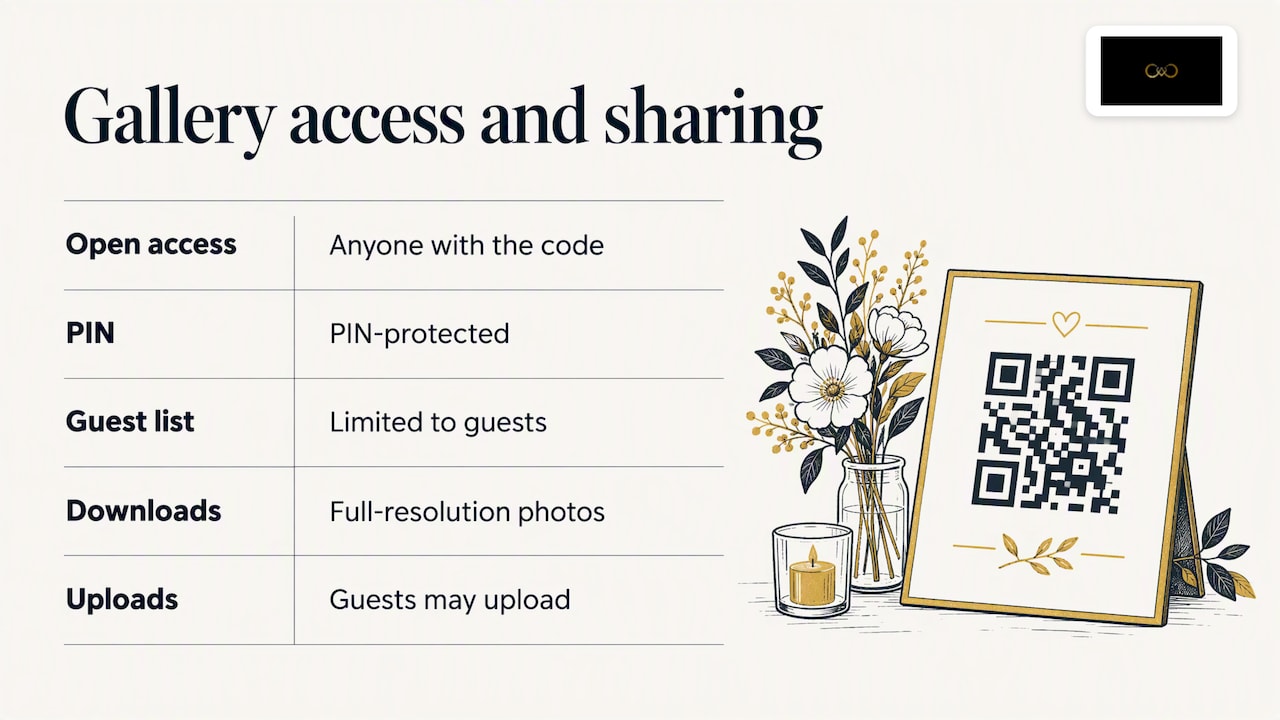
Create the event gallery, name it clearly (for example, the couple’s names and the wedding date), and choose the access rules. Decide whether the gallery is open to anyone with the code, protected by a PIN, or limited to a guest list. Decide whether guests may download full-resolution photos and whether they may upload.
Step 3: Generate the code
Generate the QR code from the gallery’s link. If you use a platform built for photographers, the code is created for you and linked to the event. Download it in a high-resolution format, such as PNG or SVG, so it stays sharp when enlarged for a standee or banner.
Step 4: Check the design
Keep a plain, dark code on a light background. Fancy colours, patterns or a logo covering the middle can make scanning fail, especially in dim venues. Leave a clear blank margin around the code. A code that looks beautiful but does not scan is worse than a plain one that works.
Step 5: Test it properly
Print a sample at the real size and test it before the order goes to the printer:
Scan it on an Android phone and an iPhone.
Scan it from the distance a guest would stand, not from ten centimetres away.
Scan it in poor light, such as a dim reception hall or a mandap lit by warm lamps.
Try it on mobile data as well as Wi-Fi, because venue Wi-Fi is often weak or crowded.
Open the gallery fully and check that photos load, download and, if allowed, upload.
Ask someone who did not help you build it to try. They will find the confusing step in seconds.
Step 6: Keep the link live
Once a code is printed or shared it cannot be changed, so do not point it at a temporary page. Make sure the gallery stays online for as long as you have promised guests, and tell the couple how long that is.
How photographers can deliver an organised gallery with a QR code
For photographers, the code solves a problem every wedding season creates: delivery. Without it, you end up sending one link to the couple, another to the parents, a folder to the videographer and a dozen individual photos to uncles who ask on WhatsApp. Each request takes time and each file is hard to track.
With one code and one gallery, you do the upload once. The couple, their families and the guests all reach the same place. A few practical habits make this work well:
Upload during the event, not weeks after. Instant uploads from the camera let guests see highlights while the excitement is fresh. That is when they are most likely to share and talk about your work.
Brand the gallery. Your name, logo and colours on the gallery mean every guest who opens it sees who took the pictures. Our article on designing a wedding gallery that feels better to use goes into layout and navigation.
Let the family choose their album pictures online. Letting the couple pick favourites in the gallery cuts back-and-forth messages. See our wedding album selection tool for photographers.
Remember the work after the wedding. Delivery is one part of a longer to-do list, which we describe in what work is left for the photographer once the wedding is over.
There is a business benefit too. Guests who admire the photos are potential clients for engagements, birthdays and their own weddings. A gallery that carries your branding and an easy way to contact you, such as a WhatsApp enquiry button, turns a delivery into a referral. We explain this in how wedding photographers can turn every wedding into more leads.
How couples can use a QR code to collect guests’ photos
If you are the couple, the idea is simple: your guests take hundreds of photos you will never see unless you ask. A QR code gives them a reason and a way to share.
A sensible plan looks like this:
Talk to your photographer first. Ask whether they offer a gallery with a QR code. It keeps the professional and guest photos together and avoids two competing links.
Choose the upload rules. Decide whether guests can only view, or also upload. Uploads give you more candid pictures, but you may want to approve what appears.
Add the code to your stationery. Put it on the wedding website, the invitation insert or the programme card, and again at the venue.
Tell the emcee or a family member to mention it. A short announcement at the start of the reception, and again at dinner, does more than any sign.
Set a time limit. Tell guests the gallery will be open for a set period, so they upload early rather than meaning to.
Multi-day weddings give you more chances. A code can appear at the Mehendi, the Sangeet and the main ceremony, so guests build the album across the days. Our blog post on QR codes at weddings and the guest experience shows how couples have approached this, and our QR code photo sharing page for weddings explains how it works on our platform.
Where to display the code and what the sign should say
Guests scan when they have a free minute and a reason. Place the code where they naturally pause:
At the entrance or welcome desk, where people queue to greet the family.
On each table, as a small card or standee, since people sit for long stretches at dinner.
Near the bar or food counters, where there are queues.
At the photo booth, so guests can see their booth pictures straight away.
On the stage screen, shown between performances at the Sangeet.
On the invitation or wedding website, so guests can plan to take pictures before they arrive.
The size matters. A code on a table card should be at least about 4 to 5 cm wide, and a standee near the entrance should be much larger. Make sure it is not behind flowers, glare or a decorative frame.
Writing a sign that gets scanned
A bare square gives guests no reason to act. Add one line that says what they get, one line that says how, and the short link as a fallback. A few wordings that work in tone for an Indian wedding:
“Scan to see our wedding photos, and add yours.”
“Find your photos from the Haldi, Sangeet and wedding. Scan with your phone camera.”
“Took a great picture? Scan and share it with us.”
“Scan to find photos of you. No app needed.”
Keep it short, readable in a glance, and in the language your guests use most. A bilingual sign in English and Hindi, Tamil or another local language is often better than English alone.
Keeping guest photos private
Photos of faces are personal, and a wedding gallery holds pictures of many people who never signed up for anything. Treat this seriously, especially when a gallery uses face recognition.
In India, the Digital Personal Data Protection Act, 2023 governs how personal data is handled. As the Act describes it, a request for consent must come with a notice that identifies the personal data and the purpose, explains how a person can exercise their rights and how to complain. Consent must be free, specific, informed, unconditional and unambiguous, given through a clear affirmative action. If you run a gallery for others, such as a studio, or run a large event, ask a lawyer how these rules apply to your case.
In practice, these habits help:
Tell guests what the code is for. A line on the sign such as “photos from this event, shared with the family” sets expectations.
Limit who can view. Use a PIN or guest access setting if the event is private, and avoid posting the gallery link on public social media.
Control uploads. Let the host approve or remove pictures, so a guest cannot post something that embarrasses the family.
Let people opt out. If a guest does not want to appear in the gallery or in face matching, give them a simple way to ask for removal.
Set an end date. Decide how long the gallery stays online and delete it afterwards when it is no longer needed.
Protect children’s photos. Be extra careful with pictures of minors and discuss with parents before making them widely available.
Our platform includes privacy controls so hosts can manage guest access and album selection, and the photographer’s clients stay in charge of who sees what.
What to do if guests cannot scan the code or upload
Something will go wrong for a few guests. Plan for it, and it will stay a small problem.
The camera does not react. Ask the guest to hold the phone steady about 20 to 30 cm away and tap the screen to focus. Older phones may need a QR scanner option in the camera or browser.
The code is too small or dark. Move it to a brighter spot or print a larger copy. This is why testing at real size and in real light matters.
The link opens but photos do not load. Venue networks can be slow. Suggest switching to mobile data, or try again once they are outside the hall.
Upload fails. Large videos take time. Ask guests to upload on Wi-Fi at home later, and make clear the gallery stays open.
A guest does not want to scan. Offer a short web link on the sign, or let a family helper share the link on WhatsApp.
Nobody scans at all. The sign is probably not visible or does not say why. Add the announcement and a clearer call to action.
Name one person, a cousin or a member of the photography team, as the helper. Tell them where the sign is and how the gallery works, so they can step in when an uncle asks for help.
Our view: the code is only as good as the experience behind it
We built It’s Forever Studio around one problem: photo delivery at Indian weddings is messy. Photographers send many links, couples ask where the pictures are, and guests wait weeks to see themselves.
We think a QR code is a good answer, but only when the whole path works. The code has to open quickly with no app. The gallery has to carry the photographer’s own branding, so the work is credited. Face recognition has to cope with real wedding conditions, which means warm stage lights, crowded group shots and heavy jewellery and dupattas, not studio portraits. And privacy has to sit with the people who own the event, not be an afterthought.
For photographers, we believe delivery should also be a way to grow. Each guest who opens a branded gallery is a possible referral, and an enquiry through WhatsApp is easier than finding your number in a forwarded message. That is why lead generation sits beside delivery in our platform rather than being a separate tool.
— Gowtham
Using It’s Forever for your event gallery
If you are a photographer, It’s Forever Studio lets you upload from the camera as the event runs, share the gallery through one QR code, add face recognition tuned for Indian wedding lighting, and keep the experience branded as yours. Pricing is pay-as-you-go, based on storage and event duration, with a free trial to begin with, so you can test it on a real event before you commit. You can see the details on our QR code photo sharing page.
FAQ
Do guests need an app to scan an event photo QR code?
No. Most current phones read QR codes through the standard camera, and the link opens in the browser. That is why a code works for guests of all ages without installing anything.
Can the QR code let guests find only their own photos?
Yes, if the gallery uses face recognition. A guest takes a selfie and sees the photos in which they appear. Hosts should tell guests about this feature and offer a way to opt out.
When should I put the QR code up at a wedding?
Show it from the start, on the invitation or wedding website, and again at the entrance and the tables. Repeat it in an announcement during the reception, because that is when most guests take out their phones.
Is it safe to share a wedding gallery with a QR code?
It can be, if you control access. Use a PIN or guest limit for private events, let the host remove pictures, and set a date when the gallery goes offline. For questions about the legal duties of whoever holds the data, speak to a lawyer familiar with India’s data protection law.
What if my QR code does not scan?
Check its size, contrast and lighting, then test it on more than one phone. Always add a short web link on the sign so guests have another way in.
Sources
Recommended
Deliver photos to every guest — instantly.
Forever handles instant delivery, QR sharing, and face recognition — all in one place. Try it free.
Start for free →