deliver-event-photos
How to Deliver Event Photos: A Workflow That Works

How to Deliver Event Photos: A Workflow That Works
The best way to deliver event photos is a single branded gallery that guests and clients open from one QR code or one link, with a curated set of edited selects, clear download rules and a stated expiry. Everything before that (backup, culling, folder structure) exists to make that one page feel calm and professional. Below is the whole workflow, from the memory card to the moment a guest finds their own photos on their phone.
ItsforeverMake Event Photo Delivery EasierItsforever helps photographers share curated event galleries through a single QR code, with instant uploads, AI face recognition, and client privacy features.Explore Itsforever Studio
TL;DR
Back up in two places before you leave the venue, then cull to a tight set of edited selects instead of sending the full take.
Organise the gallery in the order the event happened, so nobody has to scroll through thousands of frames.
Give guests one QR code, with no app to install, and let face search do the finding.
Tell the client in writing what they can download, in which resolution, and until when.
In India, treat consent and children’s photos carefully under the DPDP Act 2023, especially if you use face recognition.
Table of Contents
Why delivery is where events are won or lost
Step 1: Agree the delivery terms before the event
Step 2: Import and back up without losing a frame
Step 3: Cull to selects, not a data dump
Step 4: Organise the gallery in the order the day happened
Step 5: Choose how you deliver
Step 6: Make it effortless for guests with a QR code
Step 7: Brand the experience
Step 8: Tell the client exactly what they are getting
Step 9: Handle privacy and consent properly
What we have learned from watching delivery go wrong
Putting it together with It’s Forever
A simple checklist to run at every event
Why delivery is where events are won or lost
You can shoot a flawless Haldi or a corporate gala and still leave the client unhappy if the photos arrive late, in five different links, or in a folder of 4,000 unsorted files. Clients remember the shoot for a day. They remember the delivery for months, because that is the part they touch, share and judge you by.
Guests make this harder. At an Indian wedding, a hundred relatives will ask the couple, the family and you for “my photos”. If each request becomes a WhatsApp forward of a Drive link, you lose time and control, and the couple loses privacy.
A good delivery workflow solves three things at once: speed, order and access. The sections below take them in the sequence you actually work.
Step 1: Agree the delivery terms before the event
Delivery starts in the brief, not after the shoot. A brief written before the event should cover who must not be photographed, branding requirements, priority people or moments, who your contact is on the day, delivery dates and usage rights.
For weddings, add the things families care about and rarely say aloud:
Which ceremonies are private (some families do not want certain rituals shared beyond close relatives).
Whether the couple wants guests to have access to the gallery, and to all of it or only photos they appear in.
Whether elders, children or in-laws have specific concerns about being photographed or shared.
How long the gallery will stay online, and what happens after.
If you want a ready list of what couples should ask you, our guide to questions to ask your wedding photographer before booking shows what clients are already thinking. Answer these in your quote and you save yourself awkward emails later.
Step 2: Import and back up without losing a frame
The safest habit is simple: never let the only copy of an event live on one card or one drive.
Transfer cards during natural breaks, such as the lull between the Baraat and the pheras, or between sessions at a conference.
Copy to your laptop and to a portable drive straight away.
Keep the cards untouched until the images are verified on both copies.
Name the folder with year, client and event so you can find it two years later.
If your camera supports it, instant upload during the event changes this step. Selected frames reach the gallery while the function is still on, so the family sees the first photos the same evening instead of the next week. That is the idea behind instant photo delivery, and it is the strongest way to keep excitement high while you do the slower work of editing.
Step 3: Cull to selects, not a data dump
The first instinct after a long event is to send everything. Resist it. A client who receives a tight, edited set sees a finished product. A client who receives the full take sees homework.
A practical structure is to cull to a tight set of edited selects and keep that separate from the full take, in a year, client and event folder with a Selects subfolder. For a wedding, that usually means:
Full take: raw and unedited, kept in your archive.
Selects: the frames you would be proud to show a stranger.
Highlights: a short set for quick sharing on the day or the next morning.
Two checks before you move on. First, remove near-duplicates: five almost identical group shots help no one. Second, look hard at eyes and expressions in group photos, because a wedding group of thirty relatives has someone blinking in nearly every frame.
Batch-edit for consistency. Match colour across the venue changes, particularly indoor tungsten halls and bright outdoor Mehendi lawns, so the gallery looks like one story rather than ten different cameras.
Step 4: Organise the gallery in the order the day happened
People find photos by remembering moments, not file numbers. For corporate events, guidance from TheCamera.School recommends a chronological structure: arrivals, venue details, programme, networking, awards and after-party. It reduces overwhelm and makes images easier to find.
The same logic works for weddings, with your own albums:
Event type | Sensible gallery sections |
|---|---|
Wedding | Haldi, Mehendi, Sangeet, Baraat, Pheras, Reception, Family portraits |
Corporate event | Arrivals, Stage and programme, Networking, Awards, After-party |
Birthday or small celebration | Decor, Cake cutting, Family, Guests, Candids |
Keep section names short and in the words the family uses. A gallery that reads like the day’s schedule feels personal, and the couple will find the Haldi photos without asking you.
If you want to see what makes a gallery pleasant to use rather than merely functional, we wrote about designing a wedding gallery that feels better to use.
Step 5: Choose how you deliver
There are a few common ways to get photos to people. Each fits a different situation.
Method | Works well for | Weak spot |
|---|---|---|
Cloud folder link (shared drive) | A small set sent to one person | Messy for many guests, no branding, hard to control who forwards it |
Pen drive or hard disk | Clients who want a physical keepsake alongside the online copy | Slow, easy to lose, no way for guests to access |
Branded online gallery | Most weddings and events | Needs a setup you trust |
Gallery with QR code and face search | Events with many guests | Needs clear consent and privacy settings |
The basic pattern for a gallery is to export at the agreed resolution, upload to a branded client gallery, and send the link with a personal note and download instructions. A proofing gallery also lets clients view selects and mark favourites, which matters for album design. If you sell albums, see our practical workflow for album proofing online and how online album selection removes the long WhatsApp chains of “page 12, photo 3, change this”.
Pen drives are fine as an add-on. As the main delivery, they leave guests out entirely.
Step 6: Make it effortless for guests with a QR code
Guests are the reason delivery gets complicated, and they are also your best source of future bookings. Asking them to download an app, create an account or remember a password loses most of them at the first step.
A QR code removes that. Print it on a small table card, a welcome board, the wedding stationery or the screen at the reception. A guest points a phone camera at it, the gallery opens in the browser, and that is the end of the instructions. Our page on QR code photo sharing for weddings explains how this works for a single event.
Some practical tips:
Place the code where people wait: the registration desk, the buffet, the photo booth.
Print it large enough to scan from a short distance, and test it on both Android and iPhone before the event.
Add one line under the code saying what it does, for example “Find your photos from tonight”.
Use the same single link on invitations and thank-you messages, so there is only one address to remember.
The second piece is finding yourself. Nobody wants to scroll through 2,000 images of other people’s cousins. Face search lets a guest take a selfie and see only the photos they appear in. Indian weddings are a hard case for this: low-light halls, coloured stage lighting, heavy jewellery, dupattas over faces and big groups. This is why we tuned face recognition photo sharing for those conditions specifically.
Step 7: Brand the experience
The gallery is the last thing the client sees of your work, and it is also what guests forward. Put your studio name, logo and colours on it, and make sure your contact details are one tap away. A branded page turns each forwarded link into a quiet introduction to your studio.
That is also where bookings come from. When a guest enjoys finding their photos, a simple enquiry option on the gallery, ideally one that opens WhatsApp, turns that goodwill into a conversation. We go deeper on this in how wedding photographers can turn every wedding into more leads, and the lead generation feature is built around it.
Step 8: Tell the client exactly what they are getting
Most delivery disputes are not about quality. They are about expectations: “I thought I could download everything”, “I thought the link was permanent”, “I did not know you would only keep it for three months”.
So write it down in the delivery message:
What is in the gallery (selects, highlights, full set).
Which resolutions can be downloaded, and by whom.
Whether guests can download, or only view.
The date the gallery expires, and how to ask for an extension.
Who to contact if a photo is missing.
The point is to agree gallery access, download permissions and availability with the client and state the expiry in the message. Keep the message personal. Two lines of warmth, such as mentioning a moment you loved, do more than a template.
A realistic timeline
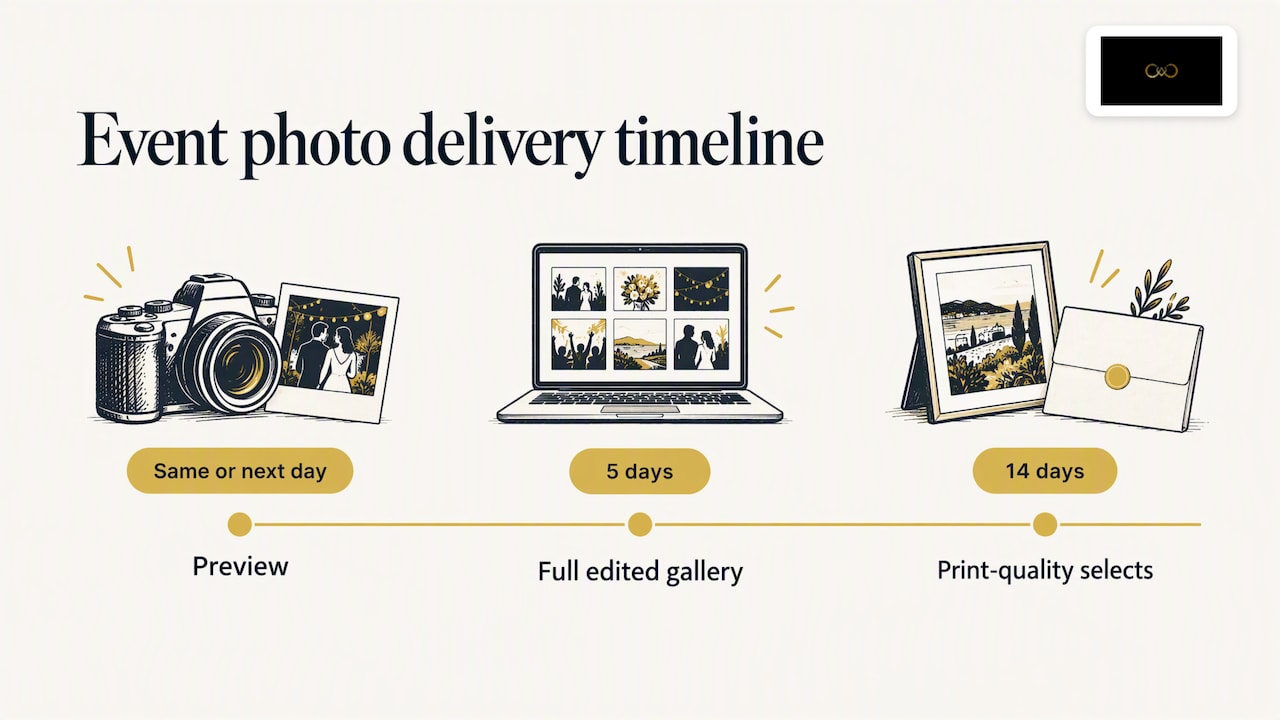
WebMobi’s event guidance suggests previews the same day or next day, a full edited gallery at five days and print-quality selects at fourteen days. That works well for corporate events. Weddings carry far more images and heavier editing, so most studios set their own, longer timeline. Whatever you choose, promise a date you can keep, and send a preview early so the client is never left wondering.
Step 9: Handle privacy and consent properly
This is the part many photographers skip, and in India it is now worth taking seriously. The Digital Personal Data Protection Act, 2023 allows personal data to be processed only for a lawful purpose, with consent or for certain legitimate uses. It also says that before processing a child’s personal data, the data fiduciary must obtain verifiable consent from a parent or lawful guardian, with a child defined as anyone under 18.
A photograph of an identifiable person is personal data, and face recognition goes a step further by turning faces into searchable data. Whether and how the Act applies to your specific business is a question for a lawyer, but good practice is clear enough to start on today:
Tell guests in plain language that face search is available and what it does.
Make it optional: a guest who does not want to use it should still be able to see the shared gallery or opt out.
Be extra careful with photos of children, and get the family’s agreement on whether minors appear in guest-facing galleries.
Limit how long data is kept, and say so.
Keep a record of what the client agreed to.
HyperVerge’s guide to facial recognition in India recommends plain-language notice, specific informed consent, purpose and retention limits, auditable records and an easy way to withdraw for face-search workflows. Those habits are sensible for any photographer, whatever tool they use.
Practical controls matter here: password or private-link galleries, the option to hide specific albums from guests, and the option to switch off downloads. Give the couple the final say on who sees which ceremony.
What we have learned from watching delivery go wrong
We build It’s Forever for photographers, and the same patterns keep showing up in how photographers talk about delivery. The delivery problem is rarely the photos. It is the scattered links, the repeated requests from guests, and the gap between the wedding and the first image the family sees.
That is why we built around four ideas. Photos should reach the gallery from the camera while the event is still happening. Guests should need nothing more than their phone camera. Face search should be tuned for the lighting and crowds of an Indian wedding, not a studio portrait. And the whole experience should carry your branding, not ours, with privacy controls the couple can understand.
We also think delivery is part of marketing. A guest who finds their photos in ten seconds remembers the photographer who made that possible. Our view is that photographers should spend their energy on the shoot and the edit, and let a clean delivery system do the repetitive work. If you want to see what the weeks after a wedding involve, we wrote about what work is left for the photographer once the wedding is over.
— Gowtham
Putting it together with It’s Forever
If you are a photographer or studio that wants this workflow in one place, It’s Forever Studio gives you instant uploads from your camera, QR code access for guests without any app, AI face recognition tuned for Indian wedding lighting, branded galleries, online album selection, WhatsApp-linked lead generation and privacy controls. It is pay-as-you-go, based on the online storage you need and the event duration, with no fixed plans or yearly subscriptions, and you can start with a free trial.
A simple checklist to run at every event
Brief agreed: privacy, delivery dates, gallery expiry.
Cards backed up twice before leaving the venue.
Highlights shared within a day or two.
Selects culled, edited and sorted in event order.
Gallery branded, with a QR code printed for the next event.
Delivery message sent with download rules and expiry date.
Consent and privacy settings confirmed with the client.
A follow-up message a few weeks later, asking for a review or a referral.
FAQ
What is the fastest way to deliver event photos?
Share a small highlights set the same day or next morning through a gallery link or QR code, and follow with the full edited gallery. Instant upload from the camera makes the first step almost immediate. Guests then see photos while the event is fresh.
How many photos should I deliver from an event?
There is no fixed number, because it depends on the event’s length and what you promised in the quote. Deliver a curated set of edited selects rather than every frame, and keep the full take in your archive. A tighter gallery is easier to enjoy and share.
Is it legal to use face recognition for event photos in India?
The DPDP Act 2023 allows personal data to be processed for a lawful purpose with consent or for certain legitimate uses, and requires verifiable parental consent for children’s data. So tell guests clearly, make face search optional and be careful with minors. For your own business setup, speak to a lawyer who handles data protection.
How long should an event gallery stay online?
Decide this with the client before the event and write the expiry date in your delivery message. Include how they can request an extension and how to download their photos before then. Clear terms prevent most later complaints.
Do guests need an app to see their photos?
No. With a QR code, a guest scans with the phone camera and opens the gallery in the browser. Nothing to install, no account to create.
Recommended
Deliver photos to every guest — instantly.
Forever handles instant delivery, QR sharing, and face recognition — all in one place. Try it free.
Start for free →