whatsapp-lead-generation
WhatsApp Lead Generation for Photographers in India

WhatsApp Lead Generation for Photographers in India
For most Indian couples, the first message to a photographer is a WhatsApp message. WhatsApp lead generation for photographers simply means making that message easy to send, answering it fast, and keeping track of where each enquiry came from. You do not need a chatbot or a big budget. You need a proper Business profile, a few links and QR codes placed where couples already look, and a short routine for replying.
This guide walks through the whole process in order, with examples from a typical wedding enquiry, and ends with the consent rules you should respect.
Its foreverMake Event Photo Delivery EasierIts Forever helps photographers deliver curated event galleries through a single QR code, with instant uploads and AI face recognition.Explore the platform
TL;DR
Set up a WhatsApp Business profile with your studio name, service area, honest hours and a catalogue of packages.
Put a click-to-chat link with a pre-filled message on your website, Instagram bio and Google profile, and a QR code on anything printed.
Use a different pre-filled message for each place, so you can tell where every lead came from.
Reply fast, ask for the wedding date and city first, then qualify with three or four short questions.
Message only people who have agreed to hear from you, and keep a note of when and where they agreed.
Table of Contents
Why WhatsApp suits wedding photography enquiries
Step 1: Set up WhatsApp Business properly
Step 2: Make it easy to start a chat
Step 3: Reply like a studio that has your date free
Step 4: Follow up without being pushy
Step 5: Measure what is working
Consent, privacy and messaging rules
Our perspective: the best leads are already at the wedding
Connect your WhatsApp enquiries to your delivery workflow
A one-week action plan
Sources
Why WhatsApp suits wedding photography enquiries
A couple choosing a photographer is not buying a pair of shoes. They want to ask about dates, whether you travel to another city, how many photographers come for the Sangeet, and what the album looks like. A contact form with a three-day wait does not suit those questions. A chat does.
WhatsApp’s own business team describes the appeal in similar terms: prospects can ask questions, get recommendations and move towards a purchase within one messaging thread, and the platform supports catalogues and rich media. For a photographer, that means you can send a sample gallery, a package list and a voice note in the same conversation where the couple first said hello.
There is also a practical reason. Families in India already use WhatsApp for everything, and a wedding is planned by several people at once: the couple, parents, sometimes an uncle who manages the budget. A chat can be forwarded to all of them in seconds. An email with a PDF often cannot.
Step 1: Set up WhatsApp Business properly
If you still use your personal number for enquiries, switch to the free WhatsApp Business app. It keeps your studio conversations separate from family chats and gives you tools that matter for lead handling.
Fill in the profile completely:
Studio name and category. Use the name couples will see on Instagram and your website, so they recognise you.
Logo or a clear portrait. A readable logo works better than a wedding photo cropped into a circle.
Service area and address. Say which cities you cover and whether you travel for destination weddings.
Hours. Only list hours you actually keep. A couple who messages at 10 pm and gets a reply at 10 am the next day is fine if your profile says so.
Website and Instagram links. Couples will check both.
Catalogue. Add your packages with a photo and a short description each. Do not worry about adding prices if you prefer to discuss them on a call, but do describe what is included.
Then set up two automatic tools:
A greeting message that goes out the first time someone writes. Keep it to three lines: who you are, that you will reply shortly, and a request for the wedding date and city.
Quick replies for the questions you answer every week: availability, package details, travel charges, delivery time and payment schedule. Type a short shortcut and the full answer appears.
A good greeting might read: “Hi, thank you for writing to [Studio name]. Could you share your wedding date and city? We will confirm availability and send our package guide shortly.” It is short, it asks one useful thing, and it tells the person what happens next.
Also use labels. Create tags such as New, Date confirmed, Quote sent, Call booked, Booked and Not now. A lead you cannot find again is a lead you lose.
Step 2: Make it easy to start a chat
A lead only exists if someone taps a button. Your job is to put that button in every place a couple might find you.
Click-to-chat links with a pre-filled message
WhatsApp offers a free click-to-chat link in the format wa.me followed by your full phone number in international format. You can add a pre-filled message, which appears in the text box when the person opens the chat. They only need to press send.
For an Indian number, that means the country code 91 followed by the ten digits, with no zeros, brackets or dashes. Test the link on your own phone before you publish it.
A pre-filled message does two jobs. It removes the blank-screen problem, where a shy couple does not know what to type. And it tells you the source. Make a different message for each place:
Where the link sits | Pre-filled message example |
|---|---|
Website contact button | Hi, I found your website and would like to check availability for my wedding. |
Instagram bio | Hi, I saw your work on Instagram and would like to know your packages. |
Google Business Profile | Hi, I found you on Google and would like to enquire about wedding photography. |
Printed brochure or banner QR | Hi, I scanned your QR code and would like to talk about my wedding. |
Wedding gallery page shared with guests | Hi, I saw the gallery from a wedding and would like to enquire for my own event. |
When the message arrives, you will know straight away which channel worked, without asking and without any software.
QR codes for offline enquiries
A QR code is the same link in a form people can scan. Put one on your visiting card, studio signage, wedding-fair stand, album box and the thank-you card you send after delivery. Because the pre-filled message inside is unique, a scan from a bridal exhibition looks different from a scan from a brochure.
Wedding guests are a particularly good audience. They are at a celebration, they have just seen your work in use, and many of them are getting married themselves or have a sibling who is. If you deliver event photos through a QR code, the same scan journey can end with a gentle “planning your own event? Chat with the photographer” option. We cover that in more detail in our guides to lead capture with QR codes and turning every wedding into more leads.
Click-to-WhatsApp ads
If you want enquiries from outside your network, Meta lets you run ads on Facebook and Instagram that open a WhatsApp chat instead of a form. WhatsApp’s guide to these ads says you create them in Ads Manager: choose a campaign objective, select Messaging Apps and WhatsApp as the destination, set dates and a budget, define your audience, then add your creative and customised responses.
For a wedding photographer, a few practical points apply:
Target the city or cities where you actually work, not all of India.
Use a real wedding photograph from your own portfolio, ideally one with a couple in a clear emotional moment.
Write the ad text as a promise of a quick, helpful answer: “Check our availability for your wedding date in a chat.”
Start with a small daily budget and watch for two weeks before you change anything.
Paid ads are optional. Many studios get enough from links and QR codes alone, especially during the peak months when calendars fill up on their own.
Making the route visible everywhere
The quickest improvement for most studios is consistency. The same WhatsApp button should appear on your website header, every portfolio page, your Instagram bio and highlights, your Google profile, your email signature and your pinned posts. If you want help with the creative side of those channels, an agency offering social media and email marketing can build that consistency for you, but even a one-afternoon manual update will help.
Step 3: Reply like a studio that has your date free
Speed matters more than polish. Couples often message three or four photographers on the same evening. The one who replies in a few minutes with a clear question usually gets the conversation.
A simple order works well:
Greet and ask the date and city. That is the question that decides everything. If you are already booked that day, you can say so honestly and kindly, and perhaps suggest a colleague.
Confirm availability. Give a clear yes, no or “tentatively yes, please let me check with my team”.
Send the relevant package guide. Share the package that suits their event, not your whole price list. A two-day wedding in Jaipur and a one-evening reception in Pune need different answers.
Share proof. Send one full gallery from a similar wedding, not just a highlights reel. Couples trust what shows consistency.
Propose the next step. A ten-minute call or a visit to your studio. People rarely book in the chat alone, and a concrete next step beats a long pitch.
Answer the price question when it comes. Dodging it feels evasive, and the couple will message the next studio. If your price depends on the number of events, say that and give the range or the starting point for the most common case.
Qualify with three or four short questions
Qualifying is not an interrogation. Once you know the date and city, ask only what you need to give a useful quote:
Which events do you want covered (Haldi, Mehendi, Sangeet, wedding, reception)?
Roughly how many guests?
Do you need a photographer, a videographer, or both?
Do you have a budget range in mind?
Then tag the lead in your app and add a note, such as “Udaipur, February, 3 events, wants candid style”. If a team member takes over, they can read the note and continue without asking everything again.
Step 4: Follow up without being pushy
Most leads do not reply after your first quote. That does not mean no. Families discuss, compare and wait for another relative to return from abroad.
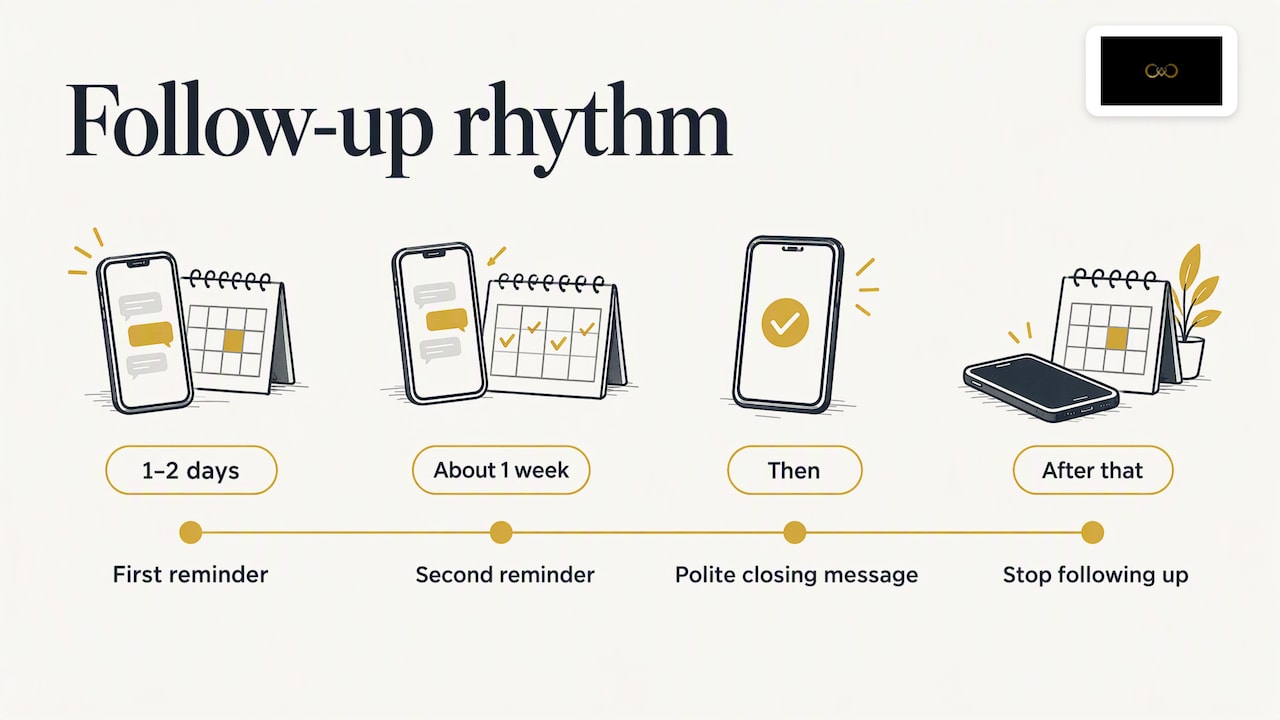
A reasonable rhythm is one reminder after a day or two, one more after about a week, and then a polite closing message such as “We will keep your date in mind. Do write if your plans change.” After that, leave it.
One technical point to know: WhatsApp limits free-form replies to a window after the customer’s last message. Once it closes, a business account that wants to start the conversation again generally needs an approved message template. If you use the standard Business app and the person replied recently, you can simply continue the chat. If you use an automation tool, check which rules apply to your setup.
Also keep things human. A follow-up that mentions something from the earlier chat (“you mentioned the Mehendi will be at the farmhouse, shall I send some photos from a similar setup?”) works better than a generic reminder.
Step 5: Measure what is working
You do not need a dashboard to learn something useful. Once a week, spend ten minutes on three numbers:
Chats by source. Count the pre-filled messages from each place (website, Instagram, Google, QR).
Qualified leads. Count the chats tagged Date confirmed or Quote sent.
Bookings. Note which source each booked wedding came from.
If you also run click-to-WhatsApp ads, WhatsApp says results can be measured with tools such as Meta Pixel, the Conversions API and offline conversions. For a small studio, the simpler habit of tagging and counting is usually enough to see which source deserves more attention.
A few patterns to look for:
Many website taps but few messages: the button may be hidden, or the pre-filled message may be off-putting. Move it and shorten the text.
Many chats but few qualified leads: you may be attracting the wrong budget. Adjust the ad copy or add a starting price on your profile.
Many qualified leads but few bookings: look at your reply speed and your follow-up routine.
Consent, privacy and messaging rules
WhatsApp is personal. People accept it as the place for family and friends, so misuse costs you trust quickly.
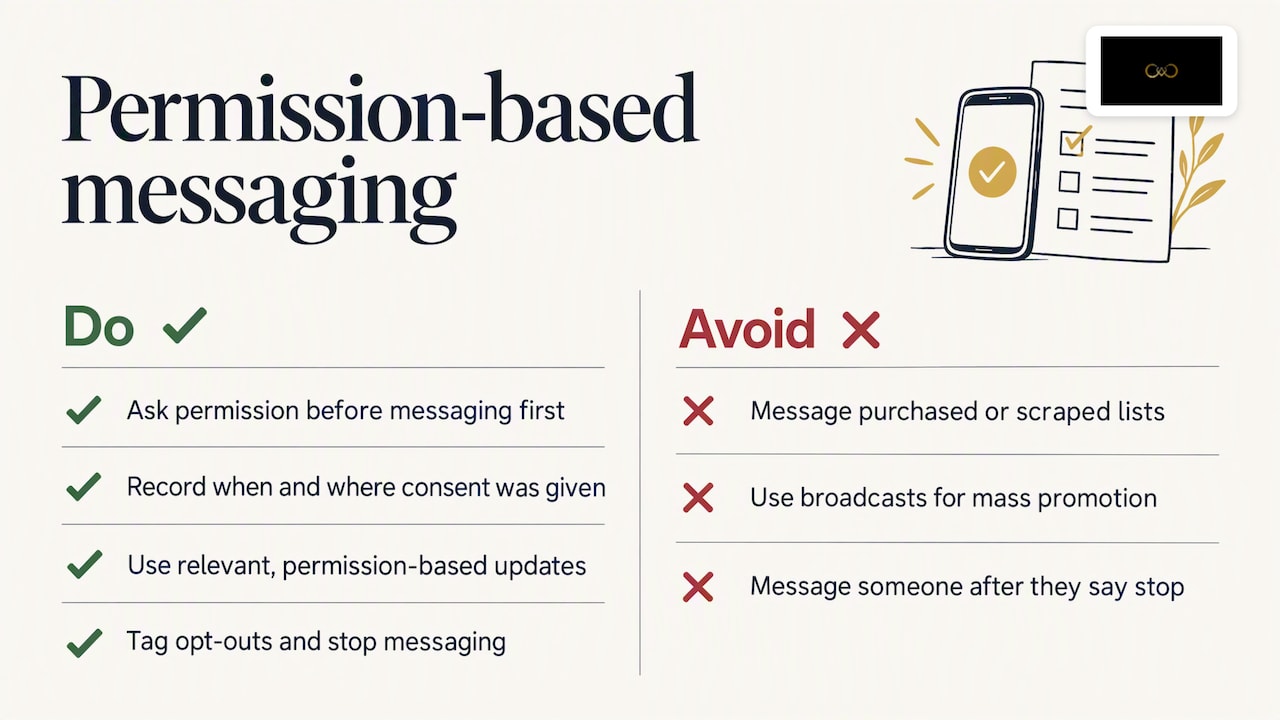
Get permission before you message first. If someone writes to you, you can reply in that conversation. If you want to send later updates, offers or reminders, ask whether they are happy to receive them, and note when and where they agreed. WhatsApp’s business rules expect businesses to hold the person’s number and opt-in for future messages, and users can block or report you, which can affect how your account is treated.
Avoid bought or scraped lists. Messaging strangers from a purchased list is the fastest way to get blocked. It also does not suit a service where trust is the product.
Use broadcast lists carefully. WhatsApp’s help centre explains that broadcast lists in the Business app send a message to selected contacts. Use them for relevant, permission-based updates such as “our festive-season mini-shoot dates are open”, and not as a mass promotion.
Respect opt-outs at once. If someone says stop, tag them and do not message again.
Treat client data with care. Wedding photographs and phone numbers of families are personal data. India’s data protection law, the Digital Personal Data Protection Act, is being brought into force in stages, so check the current position with the official government sources or a lawyer before you build a large marketing list. Whatever the legal timetable, the habits above (clear purpose, recorded consent, easy opt-out) are the safe ones.
This is general guidance for a small studio. If you plan bulk messaging, automation through the business API or large databases, take advice from a lawyer who handles data protection and telecom rules.
Our perspective: the best leads are already at the wedding
We built It’s Forever Studio around one observation: the best advertisement for a wedding photographer is a well-delivered wedding. Guests see the work, they receive their photos, and they trust the studio because the experience was smooth.
That is why we think WhatsApp lead generation should not begin with ads. It should begin with the event you are already shooting. When guests scan a single QR code to see their photos, find themselves with face recognition and see your branding on the gallery, you have the most natural moment to say “we also shoot weddings, tap here to chat”. The person arrives in your WhatsApp with context, a pre-filled message and goodwill.
The second thing we believe is that privacy is part of marketing. Couples and families want control over who sees their photographs. A photographer who lets the host manage guest access and who asks before messaging people is the photographer families recommend. In Indian weddings, referrals are the biggest source of work, and they are built on that kind of trust.
Third, speed beats sophistication. We see studios that win bookings with a plain profile, a clear greeting and a reply within minutes, while others lose them with beautiful websites and slow replies. Fix the basics first.
— Gowtham
Connect your WhatsApp enquiries to your delivery workflow
If you already deliver wedding photos digitally, you can use the same moment to collect leads. It’s Forever Studio lets you upload instantly from the camera, share galleries through one QR code that needs no app, and use AI face recognition tuned for Indian wedding lighting and large groups. Our lead generation for wedding photographers feature connects the gallery experience to WhatsApp enquiries, so guests who love the photos can reach you directly. You can explore how QR code photo sharing works, or start from the It’s Forever Studio homepage. For a wider set of ideas, our blog also covers keeping your calendar full in the off-season.
A one-week action plan
If you want to start today, this is a realistic week for a solo photographer:
Day 1: Switch to WhatsApp Business and complete the profile.
Day 2: Write your greeting message and five quick replies.
Day 3: Create one click-to-chat link per channel, each with its own pre-filled message, and test them.
Day 4: Update your website, Instagram bio and Google profile.
Day 5: Make QR codes for your visiting card, studio and album boxes.
Day 6: Create your labels and practise tagging three old enquiries.
Day 7: Write down your baseline: how many enquiries you receive in a normal week and how many become bookings.
After a month, compare. Most studios find that the biggest gain comes from replying faster and knowing which channel sends them real couples.
FAQ
How do I generate leads with WhatsApp as a photographer?
Set up a WhatsApp Business profile, then place click-to-chat links with a pre-filled message on your website, Instagram and Google profile, and QR codes on printed material. Reply quickly, ask for the wedding date and city first, and tag each lead so you can follow up. Ads that open WhatsApp are an option once the basics work.
Can I send the same message to many leads at once?
Yes, with broadcast lists in the WhatsApp Business app, but only to people who have agreed to hear from you. Keep messages relevant, such as available dates or a new package. Sending promotions to people who never asked is likely to get you blocked or reported.
How do I know which channel a WhatsApp lead came from?
Use a different pre-filled message for each link and QR code. When the message arrives, its wording tells you whether the person came from your website, Instagram, Google or a printed card. Add a label in the app and review the counts weekly.
Do I need the WhatsApp Business API?
Most solo photographers and small studios do not. The free Business app covers profile, catalogue, greeting, quick replies and labels. The API becomes useful when several people share the number or you want automation, and it comes with its own rules and costs.
Sources
WhatsApp for Business: Ads that click to WhatsApp, getting started
WhatsApp for Business: Ads that click to WhatsApp, measurement
WhatsApp Help Center: How to use broadcast lists on the WhatsApp Business app
Recommended
Deliver photos to every guest — instantly.
Forever handles instant delivery, QR sharing, and face recognition — all in one place. Try it free.
Start for free →