mehndi-photo-sharing
Mehndi Photo Sharing: How to Deliver Mehendi Photos to Everyone

Mehndi Photo Sharing: How to Deliver Mehendi Photos to Everyone
The simplest way to share mehndi photos is one private, branded gallery per event. Guests open it with a QR code, find their own pictures with face search, and never need an app or a long list of links. The photographer stays in control of who sees what. This guide explains how to set that up for the mehendi ceremony, why this function is harder than it looks, and what to check before you pick a tool.
Its foreverMake Mehendi Photos Easier to FindIts Forever helps photographers share curated event galleries through one QR code, with face recognition and privacy controls for guests.Visit Its Forever Studio
TL;DR
Give the mehendi its own album inside the wedding gallery, so family can find it without scrolling through the Sangeet or the pheras.
Use one QR code at the venue so guests reach the gallery without installing anything.
Face recognition helps most at mehendi: hundreds of guests, many group shots, mixed light.
Set privacy before you upload: decide who can view, download and select photos.
Upload during the event, not a week later, because guests want the photos while the henna is still on their hands.
Table of Contents
Why mehendi photo sharing needs its own plan
What a good mehendi gallery contains
How guests should access the gallery
Privacy: who should see the mehendi photos?
What to look for in a wedding client gallery in India
A simple workflow for mehendi photo delivery
Turning guest access into new enquiries
Common mehendi sharing mistakes
Try mehendi delivery with It’s Forever
Sources
Why mehendi photo sharing needs its own plan
Mehendi is one of the most photographed and least organised events of a wedding. It is relaxed, so people move around, sit in clusters, and pose with hands held out. Cousins, aunts and friends all take their own phone pictures, and then everyone asks the photographer, “Can you send mine?”
The usual answer is a mess of Google Drive links, WhatsApp forwards and zip files that expire. The bride’s family gets one link, the groom’s side gets another, and the friend who only wants her own photos has to open all of them.
The photography itself adds to the problem. The mehendi session is usually intimate and close-range, often indoors with a mix of natural and artificial light, as one Indian wedding photography guide describes it. That means a lot of detail shots of hands and designs, plus candid frames of people laughing, talking and being fed snacks while the artist works. Those are exactly the photos guests want to find, and they are hard to find by scrolling.
The same guide notes that most packages include hundreds of edited images per event day, organised by ceremony so clients can find what they are looking for. That is a sensible baseline. The question is how to deliver those images so it takes the client minutes, not days.
What a good mehendi gallery contains
A gallery that works for the family is organised around how people think about the day, not around file names.
Separate albums for each function
Keep Mehendi, Haldi, Sangeet, Baraat and the wedding ceremony as separate albums inside one wedding gallery. A guest who only attended the mehendi should not have to open 3,000 photos to see 200. If your couple also has a Haldi, the same logic applies. You can read how we handle this for the whole wedding in our practical guide to wedding photo sharing.
A clear split between hands and people
Henna detail shots are often what the bride wants to show first. Candid and group photos are what guests want. Sort them with simple labels or a cover image for each set. The bride gets her design photos at the top, and guests get a gallery that opens on faces.
Highlights first, full set second
Send a small set of the best 20 to 30 photos quickly, then the full edited set when it is ready. People share highlights on the same night. That is free promotion for the photographer, as long as every shared photo carries a branded gallery link back to your work.
Easy downloads
Guests should be able to save a photo on their phone in one or two taps. If the gallery asks for an account, a password sent separately, and an app install, most will give up. The bride and groom may want full-resolution downloads, while guests may need only web-size images. Decide this at the start.
How guests should access the gallery
The best access method is one that works for a 70-year-old uncle and a 20-year-old cousin without help.
One QR code, placed where people already look
A QR code on a small standee near the mehendi station, on the welcome board or on a printed card works well. Guests scan it with their normal phone camera and land in the gallery. There is no app to download, no login to remember, and no link to type. If you want to know how to design and place the code, our guide to setting up and sharing QR code wedding photos walks through it step by step.
The same code can go into the WhatsApp family group after the event. One code, one gallery, every side of the family.
Face search instead of scrolling
After a QR scan, a guest can take a quick selfie and see only the photos that include them. This is the feature that changes how people feel about delivery, because nobody has to hunt through the whole album. It is also where many tools struggle at Indian weddings.
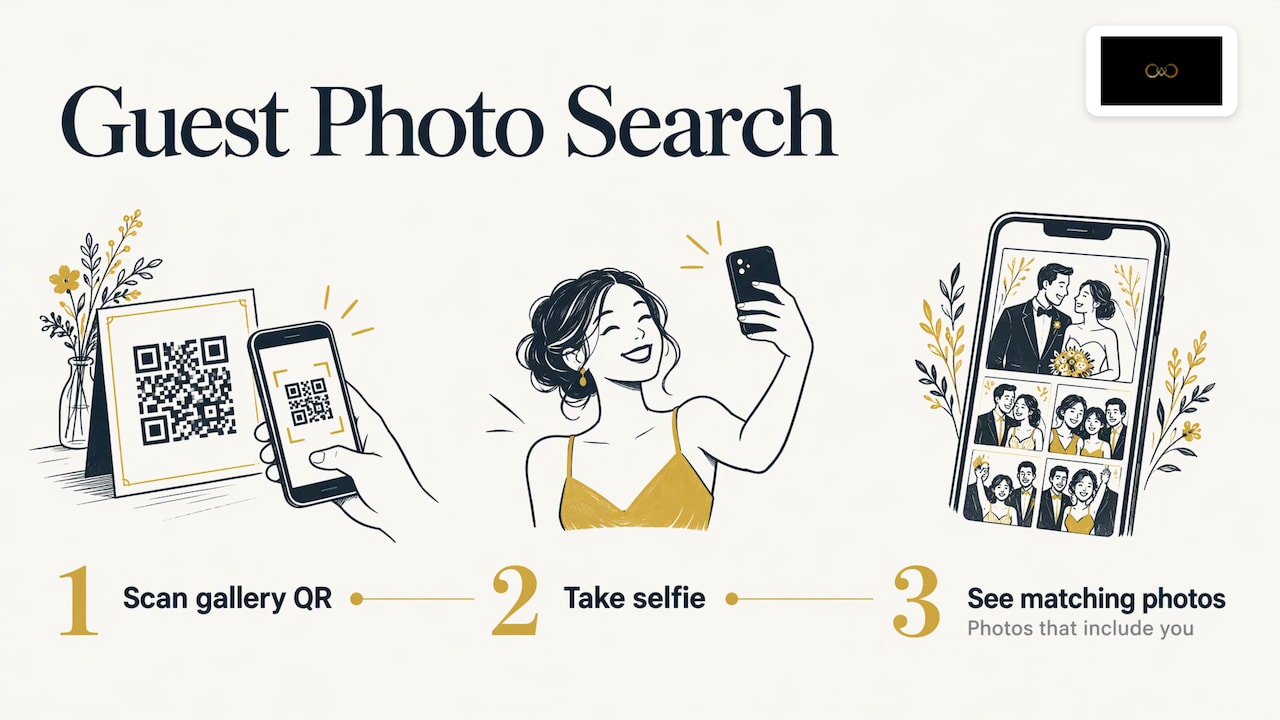
At a mehendi, faces are often partly covered by dupattas, turned down toward the henna, lit by warm decorative lamps or by a bright window, and surrounded by other people in the frame. Recognition built for passport-style photos does not cope well with that. Our face recognition is tuned for Indian wedding lighting and large group conditions, which is what mehendi, Haldi and Sangeet look like. You can see how it works on our face recognition photo sharing page.
Live access during the event
Mehendi sessions run for hours. If instant uploads from the camera feed the gallery while the event is going on, guests can check their photos before they leave. For a closer look at the method, see how live event photo sharing works for Indian weddings.
Privacy: who should see the mehendi photos?
Mehendi photos are personal. They show the bride in a relaxed mood, women without formal styling, children, and sometimes relatives who would prefer not to be posted publicly. A public link that anyone can forward is not a good fit.
Before the event, agree three things with the couple:
Who can view. Only people with the QR code or link, or everyone the couple invites to a private group.
Who can download. Decide whether guests get downloads, and at what size.
Which photos are hidden. Some couples want certain shots visible only to them. Set those aside before sharing the gallery.
A good delivery platform lets the host manage guest access and album selection from one place, so these decisions are not made over WhatsApp at midnight. This is also a trust point for the photographer: families notice when their photos stay private.
If a guest asks for their photos to be removed, act on it quickly and politely. Handling personal images carefully is part of looking professional, and it reassures a family that is handing you their most private moments.
What to look for in a wedding client gallery in India
If you are choosing a tool, judge it by what happens on a real wedding weekend, not by a feature list. These are the questions that matter.
What to check | Why it matters at a mehendi |
|---|---|
Upload speed and camera upload | Guests want photos during the event, not next week |
Access without an app | Older relatives will not install anything |
Face search quality in warm, low and mixed light | Mehendi is often indoors with decorative lighting |
Branding: your name, logo and colours | Every shared photo becomes an advertisement for you |
Privacy controls | Families expect their photos to stay within the group |
Album selection by the client | The couple chooses album photos without long email chains |
Enquiry capture | Guests who like the photos may be future clients |
Pay-as-you-go pricing | Storage and event duration should match your actual work |
The last row matters for studios with an uneven calendar. Our pricing is pay-as-you-go, based on storage volume and event duration, with no fixed plans or yearly subscriptions. You pay for what an event needs, after a free trial.
A simple workflow for mehendi photo delivery
Here is a workflow you can repeat for every wedding.
Before the wedding: Create the wedding gallery with an album for each function. Set the privacy rules and add your branding.
Print the QR code: Put it on a standee or card for the mehendi venue. Tell the family coordinator where it will be.
During the event: Upload photos from the camera in batches. Share the QR code with the family group so guests can scan it while they are still there.
Same night or next morning: Publish a short highlights set. Post one or two photos from the gallery with your studio link.
Within the agreed delivery window: Release the full edited mehendi album.
After the wedding: Let the couple pick album photos online instead of sending lists over chat. Our album selection tool for wedding photographers is built for this.
For the wider picture of post-event delivery, our workflow for delivering event photos covers what to do after the last function ends.
Turning guest access into new enquiries
A mehendi has a useful audience: friends of the bride who may be getting married next year, relatives with upcoming functions, and parents already thinking about their own events. When these people open a gallery that carries your branding, they see your work at its best.
A contact or WhatsApp button in the gallery gives them an easy way to ask about dates. This works because the interest is already there. They are looking at photos they like, from a day they enjoyed. Our lead generation for wedding photographers page explains how enquiries from guests reach you through WhatsApp.

It also helps the couple. They get a polished, professional photo experience, and a photographer who is easy to recommend.
Common mehendi sharing mistakes
Sending everything in one link. Separate functions, or guests give up.
Waiting for the full edit. A small early set keeps the excitement alive.
Forgetting the family coordinator. One person on each side should know the QR code and the plan.
Leaving privacy until later. Decide before upload, not after a relative complains.
Ignoring the guests who are not tech-friendly. If it needs an app or a password, it will fail with some of your audience.
Using plain, unbranded links. A generic drive link says nothing about your studio.
Our perspective
We built It’s Forever Studio around one observation: photographers in India do not lose clients because of their pictures. They lose goodwill in the weeks after the wedding, when families chase files across WhatsApp, Drive and email.
Mehendi shows this problem most clearly. The event is relaxed, the guest list is large, and everyone wants their own photos. That is why we focus on instant uploads from the camera, a single QR code that needs no app, and face recognition designed for the lighting and group conditions of Indian weddings.
We also believe delivery should work for the photographer’s business. A branded gallery, privacy controls for the host, and a WhatsApp-connected enquiry path turn a delivery chore into a professional experience that families remember and recommend.
Gowtham
Try mehendi delivery with It’s Forever
If you want guests to open one QR code and find their mehendi photos in seconds, It’s Forever Studio is built for that. You get instant uploads, face search, a branded gallery, privacy controls and online album selection, all in one place for Indian weddings.

Start with the free trial and set up your next mehendi gallery on It’s Forever Studio. If instant sharing is your priority, look at our instant photo delivery for photographers. For the QR side, see QR code photo sharing for weddings.
FAQ
How do I share mehndi photos with all the guests at once?
Create one gallery for the wedding with a separate mehendi album, then share a single QR code or link. Guests scan it, open the gallery on their phone and look for their photos. This avoids sending files individually or managing several links.
Can guests find their own photos without scrolling through hundreds of images?
Yes, with face recognition. A guest takes a selfie in the gallery and sees only the photos that include them. This is especially useful at mehendi, where there are many group shots and the lighting changes through the event.
Do guests need to install an app to see mehendi photos?
No. With QR code access, guests open the gallery in their phone browser after scanning. That matters for older relatives and for anyone who does not want to download another app.
How do I keep mehendi photos private?
Decide before you upload who can view, who can download and which photos stay hidden. Then share the gallery only through the QR code or link given to the invited family and friends. Personal moments, children and relatives who prefer privacy are good reasons to set this up in advance.
When should I deliver mehendi photos?
Share a small highlights set the same night or next morning, then release the full edited album within your agreed delivery time. Uploading during the event lets guests see photos while they are still together.
Sources
Recommended
Deliver photos to every guest — instantly.
Forever handles instant delivery, QR sharing, and face recognition — all in one place. Try it free.
Start for free →